How to
Adding a community document
What to send us, what we can and cannot use, what happens to a document after you send it, and what is loaded today.
Abad Naseer · 20 August 2026 · for the association and the management office
The community assistant answers residents from the association's own documents and from nothing else. When it does not have a document, it says so rather than guessing.
So adding a document is how the assistant learns something new. This page is what to send, what cannot be used, and what happens next.
Where the assistant is: https://servicez.smartzees.com Where to add a document: https://servicez.smartzees.com/admin, under Community documents. Pick the community, choose the file, and it is answering questions a minute later. If you would rather not do it yourself: reply to this email with the files attached and we will load them.
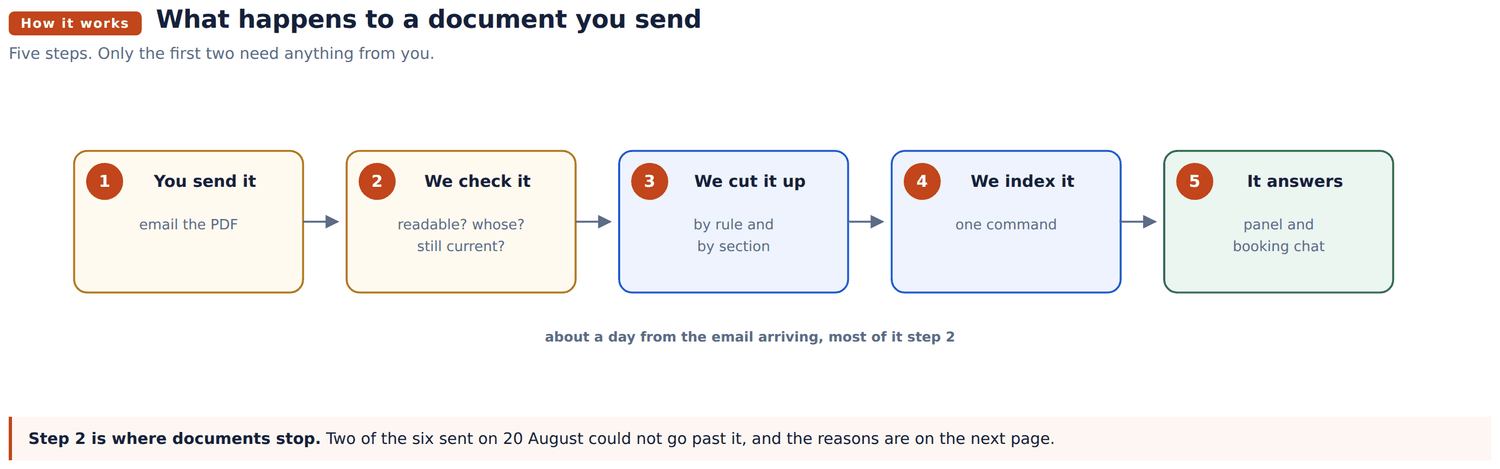
Nothing is retyped and nothing is summarised. The document is cut into sections and the assistant quotes from them, so what a resident is told is what the document says. If the document is wrong, the answer is wrong, which is why the version you send matters.
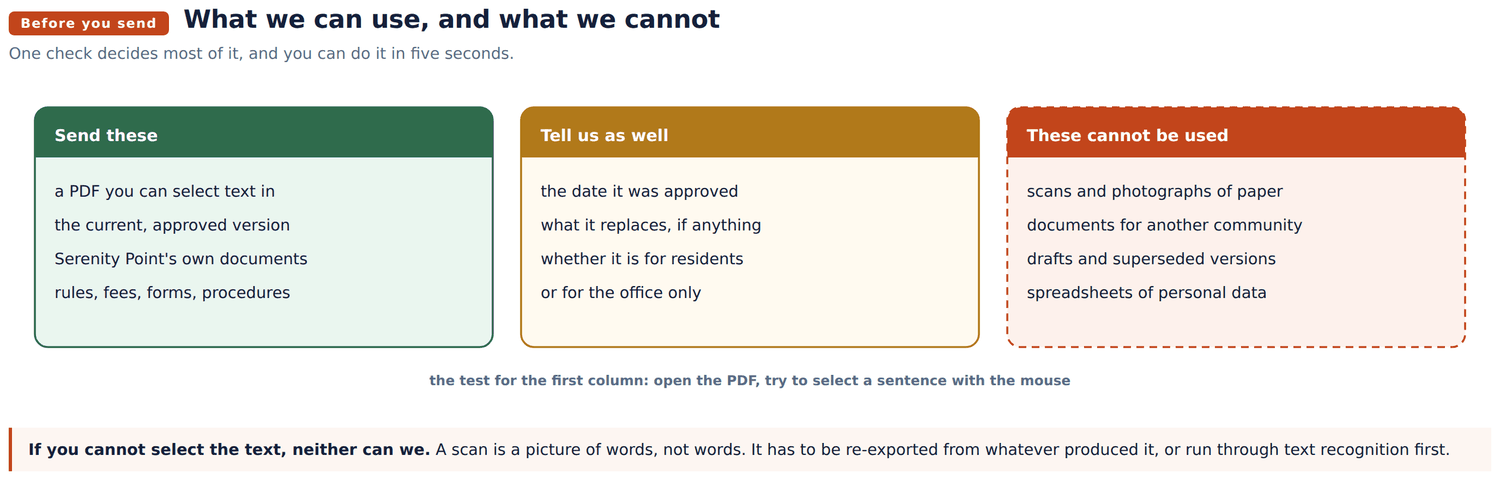
The five second test. Open the PDF, and try to select a sentence with your mouse. If the text highlights, we can use it. If nothing highlights, the file is a picture of a page rather than a page, and it has to be re-exported from whatever produced it.
Word documents are fine. So are PDFs exported from Word. It is scans and photographs of printed paper that the assistant cannot read.
A scan is still worth uploading. The screen notices there is no readable text, says so, and keeps the file as a download: a resident who asks about that subject is not given an answer out of it, but the document is there in the community's list for them to open. That is the honest half of the job, and it is better than the file sitting in an inbox.
Four short answers, whether you upload the document yourself or send it to us. They take a minute and they prevent the assistant giving confident answers out of a document that no longer applies. Two of them the screen cannot check for you: whether the document replaces one already loaded, and whether anything in it should not be quoted to a resident.
| Question | Why it matters |
|---|---|
| What is it called, and when was it approved? | Two documents often cover the same subject. The date decides which wins. |
| Does it replace something we already have? | If it does, we remove the old one. If we are not told, both stay and the assistant will report that they disagree. |
| Is it for residents, or for the office only? | Anything you send can be quoted to a resident. Internal notes and fee schedules the office uses should not be sent. |
| Does it contain anyone's personal details? | Names, addresses, account numbers and signatures should be removed first. |
about it. Section 9 explains why this one matters
Uploading it yourself skips the first five: the screen does all of that and tells you how many sections it read. What is left is the last two, and those we still do. Sending it to us instead is about a day.
| Document | Status |
|---|---|
| Rules and Regulations, approved 12 December 2024 | Live |
| Application package and rules, L&C Royal Management | Live |
| Architectural Modification Form (ARB) | Live |
| Amenities Fees, GRS Management | Live |
| Temporary Parking Pass Request | Live |
| City of Lauderdale Lakes Code Compliance Handbook | Live, kept separate from Serenity |
| Three Lakes: mailbox guidelines, design review form, direct debit form | Live |
| Kendall Square approved colour archive | Live |
| Valencia approved colour archive | Live |
| Enclave At Old Cutler approved colour archive | Live |
| Application for Occupancy, Serenity Point | Cannot be used, scanned image |
| Three Lakes Design Standards | Cannot be used, scanned image |
| Three Lakes site map and drainage drawing | Cannot be used, they are drawings |
Six associations are loaded. When somebody asks a question the assistant asks once which community they are in, remembers it, and answers from that association's documents only.
These are not faults in the assistant. They are disagreements between the documents, and the assistant currently handles each by giving both answers and naming the document each came from. Tell us which is right and it will give one answer instead.
1. Minimum lease term. The application requirements say one year. The use restrictions say no lease shall be less than six months.
2. Pets. Rule 13 of the Rules and Regulations reads as a total ban on keeping animals. The management pack allows domestic pets and bans only keeping animals commercially.
3. How long a decision takes. The board has thirty days to decide on an owner or tenant. The application package says the process may take fifteen business days. The ARB form says thirty to forty five days.
4. Working hours on site. Rule 18 allows construction Monday to Friday from 7:01am to 7:59pm. The ARB form allows contractors from 8:00am to 6:30pm Monday to Friday, and forbids Sundays, which Rule 18 permits.
Also worth confirming. Three association names appear across the documents: Serenity Point Homeowner's Association Inc., Serenity Community Association Inc., and Serenity Community Homeowners Association. Two management companies appear as well, L&C Royal Management and GRS Management.
The Application for Occupancy and the Three Lakes design standards are both scans. Eleven pages and twenty three pages of pictures of text, with no text inside them.
Two ways forward, whichever is easier for you:
which needs checking afterwards because recognition makes mistakes on tables and handwriting
Until then the assistant will say it does not have that information, rather than guessing at it. Ask it about Three Lakes today and it answers:
I do not have the Three Lakes documents, so I cannot answer from them, and I will not answer from another community's rules instead.
That is deliberate, and it is checked by a test. Three Lakes is registered by name even though we hold nothing for it, precisely so that a question about it is refused rather than answered out of the Serenity rules.
The Lauderdale Lakes handbook is loaded but held apart. Serenity Point is in Miami Lakes, and answering a Serenity resident out of another city's code would be wrong. The assistant will only use it if a question names Lauderdale Lakes.
If you send documents for another community you manage, tell us which community they belong to and we will keep them separate in the same way.
Why we ask every time. The assistant keeps a list of the community names it recognises, and that list is maintained by hand. Loading a document without adding its community to that list is the one mistake that brings back the problem this design exists to prevent: the name is not recognised as a name, so the question is treated as an ordinary one and answered from the Serenity documents. Which is why we register the name first and load the document second, and why Three Lakes is on the list already even though we cannot read its file yet.
So: one line per community, alongside the documents. Not optional, and it is the step that is easy to forget.
For whoever works on the software: how questions are routed, how a community is recognised, how retrieval is scoped, and the exact procedure for adding one.
https://servicez.smartzees.com/docs/community-rag/