Technical setup
Running the AI on our own GPU
Everything needed to create the machine and wire it to the Service Assistant: the quota that blocks everything else, the AWS permissions, the instance, the two mechanisms that stop it when nobody is using it, and how to check each one actually works.
Abad Naseer · 29 August 2026 · written to be followed by somebody who is not us
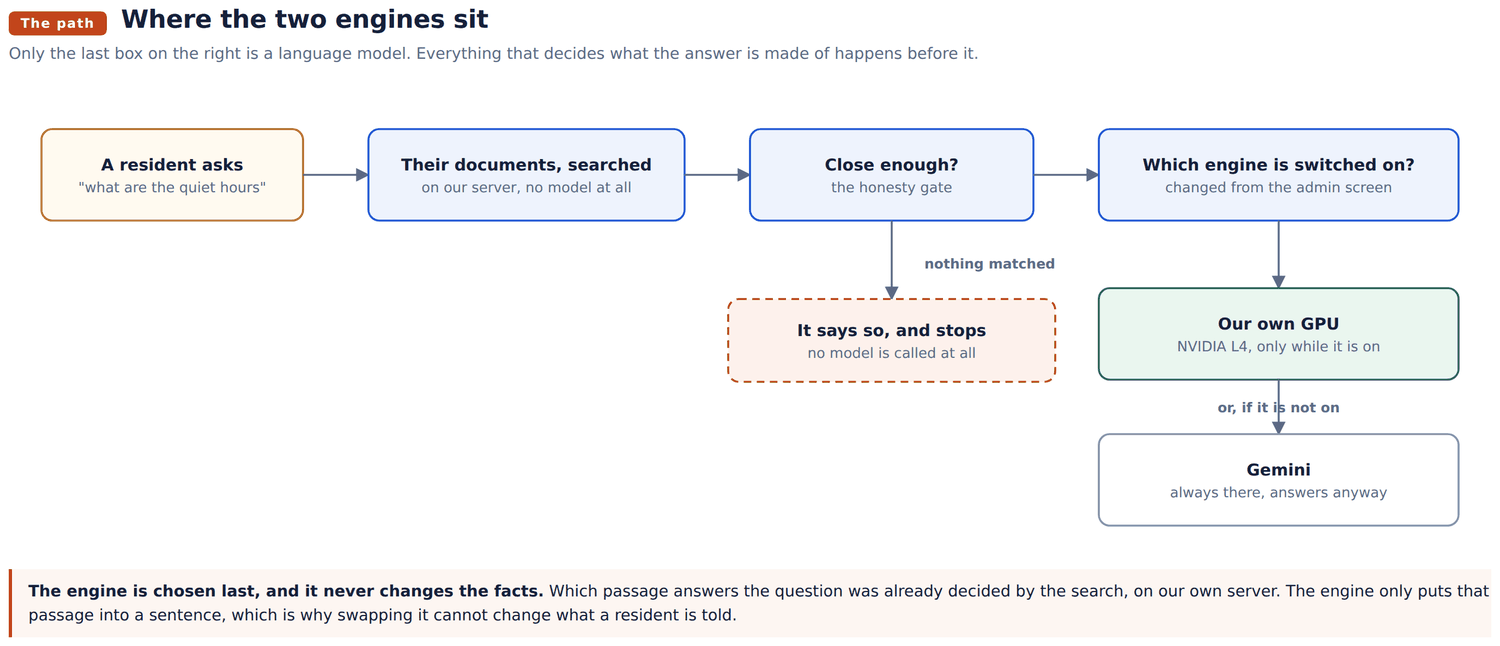
The Service Assistant answers residents from their association's documents. Almost all of that work happens on our own server: the search that finds the right passage runs there, and involves no outside service at all. One step does not. Putting the passage into plain words is done by a language model, and today that model is Gemini, which is Google's.
This document sets up a second option: our own GPU, running an open model, which an administrator can switch to from the admin screen and switch back afterwards.
Two things make it practical rather than expensive. The machine is off unless somebody has switched it on, and it switches itself off when nobody is using it.
A new AWS account is allowed zero GPU instances. Not one, zero. The limit is called "Running On-Demand G and VT instances" and it is counted in vCPUs. A g6.xlarge needs 4.
Request the increase first, in Service Quotas, in the us-west-2 region. Approval is usually a few hours and can be two days. Everything else in this document takes an afternoon, and none of it can be tested until this lands.
g6.xlarge. One NVIDIA L4 with 24GB of memory, 4 vCPUs, about $0.80 an hour while it is running and nothing while it is stopped.
The reasoning is worth knowing, because the obvious version of it is wrong. When one person asks one question at a time, the speed of the answer is set by memory bandwidth rather than by how fast the chip calculates. Every token produced requires the whole model to be read out of memory once.
| Instance | GPU | Memory | Bandwidth | Speed, 8B model | Per hour |
|---|---|---|---|---|---|
| g4dn.xlarge | T4 | 16GB | 320 GB/s | 40 to 45 tok/s | $0.53 |
| g6.xlarge | L4 | 24GB | 300 GB/s | 45 to 55 tok/s | $0.80 |
| g5.xlarge | A10G | 24GB | 600 GB/s | 75 to 90 tok/s | $1.00 |
Note that the older T4 has slightly more bandwidth than the L4. The L4 wins on newer silicon and on how quickly it reads a long question, not on raw throughput. The A10G is genuinely about 1.6 times faster for 25 percent more money, and is the one to choose if somebody watching text appear on a screen is the point of the exercise.
g6.xlarge is the right default. It is current, and 24GB leaves room to try a larger model later without changing machines.
The natural way to let one server control another is an IAM role attached to the instance. That is not available here. The Service Assistant runs on Lightsail, which carries an AWS managed role of its own and cannot be given a custom instance profile. There is nothing to attach a role to.
So the Service Assistant signs its requests as a dedicated IAM user instead, with an access key held in .env and a policy that permits starting and stopping exactly one machine.
Create a user named serviceagent-gpu-switch, with no console access and one access key, and attach this inline policy:
{
  "Version": "2012-10-17",
  "Statement": [
    {
      "Sid": "StartAndStopTheOneGpu",
      "Effect": "Allow",
      "Action": ["ec2:StartInstances", "ec2:StopInstances"],
      "Resource": "arn:aws:ec2:us-west-2:ACCOUNT_ID:instance/GPU_INSTANCE_ID"
    },
    {
      "Sid": "ReadWhetherItIsRunning",
      "Effect": "Allow",
      "Action": ["ec2:DescribeInstances", "ec2:DescribeInstanceStatus"],
      "Resource": "*"
    }
  ]
}
Start and stop are pinned to one machine, so this key cannot touch anything else in the account even if it is stolen. The two read actions cannot be narrowed the same way, because AWS does not support per resource permissions on them. They are read only, so what a leak buys is the ability to list instances.
The file is in the repository at deploy/gpu/iam-policy.json. Fill in the account id and the instance id once the machine exists.
| Setting | Value | Why it matters |
|---|---|---|
| AMI | Deep Learning Base OSS Nvidia Driver GPU AMI, Ubuntu 22.04 | The graphics driver is already installed. Doing that by hand is the longest and most failure prone part of the job |
| Type | g6.xlarge | Section 3 |
| Region | us-west-2 | Beside the Service Assistant, so the two are on the same network |
| Storage | 100GB gp3 | The image alone is about 50GB before any model |
| Shutdown behaviour | Stop | Read the warning below |
| Tag | AutoStop = true | What the safety net in section 7 looks for |
| User data | paste deploy/gpu/cloud-init.yaml | Installs everything on first boot |
Check the shutdown behaviour before trusting anything else. This machine shuts itself down when nobody is using it. If that setting says "terminate" rather than "stop", it will delete itself instead, along with the model and the configuration, every single evening.
Ollama, the program that runs the model, has no password and no authentication of any kind. Anyone who can reach port 11434 can use the GPU. That port is scanned continuously by people looking for exactly this.
| Port | Open to | Not |
|---|---|---|
| 11434 | 35.91.251.211/32, the Service Assistant | anything else, ever |
| 22 | the address you administer from | 0.0.0.0/0 |
This is the part that decides whether the machine costs a few dollars a month or five hundred and eighty. It gets two independent mechanisms because they fail in different ways.
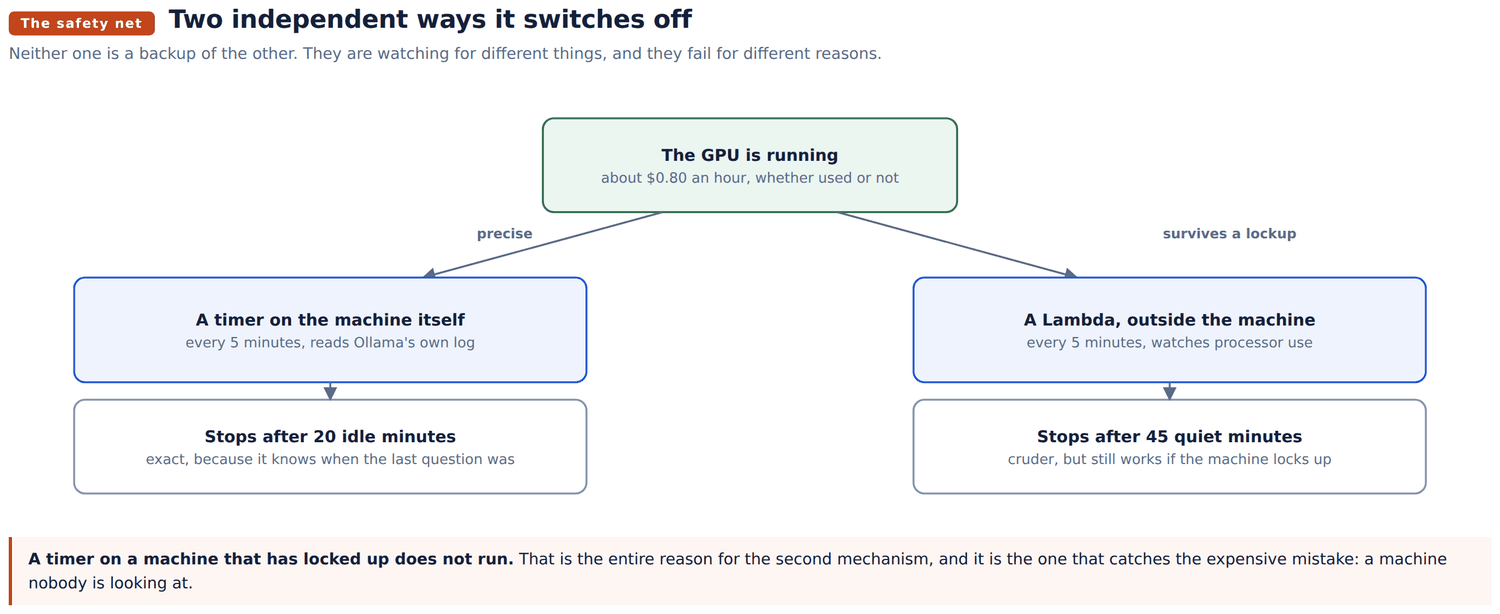
A timer runs every five minutes and reads Ollama's own log. If no question has arrived for twenty minutes, and the machine has been up at least that long, it shuts down.
This one is precise. It knows exactly when the last question was, because it is reading the record of them. What it cannot survive is the machine itself locking up, because a timer on a machine that has stopped responding does not run either.
Installed by cloud-init. The script is deploy/gpu/idle-off.sh.
A small AWS Lambda runs every five minutes, finds every instance tagged AutoStop=true, and stops any that has been running for more than 45 minutes with almost no processor activity.
This one is cruder: it cannot see Ollama, so it judges by processor use, which sits near zero on an idle machine and does not during an answer. But it runs somewhere else entirely, so it still works when the machine has locked up, and it also catches an instance somebody started from the AWS console by hand and forgot about.
The code is deploy/gpu/lambda_auto_stop.py. Python 3.12, a 30 second timeout, and an EventBridge schedule of rate(5 minutes). Its execution role is deploy/gpu/lambda-policy.json, which allows stopping instances only when they carry that tag, and does not allow starting anything at all.
Which one matters more? If you could only have one, have the Lambda. The failure that actually costs money is a machine nobody is watching, and that is precisely the case the on machine timer cannot cover.
Four lines in the Service Assistant's .env, then restart it:
GPU_INSTANCE_ID=i-0123456789abcdef0
AWS_REGION=us-west-2
AWS_ACCESS_KEY_ID=AKIA...
AWS_SECRET_ACCESS_KEY=...
Do not set OLLAMA_URL. A stopped machine loses its address and is given a different one when it starts again, so anything written down here would be correct once and wrong every time afterwards. The application asks AWS for the current address in the same call it uses to ask whether the machine is running, which costs nothing extra and cannot go stale.
Which engine actually answers is not in this file. It is switched from the admin screen, and stored in app/data/ai_runtime.json, because a setting that needed a restart to change would be no use a minute before a meeting.
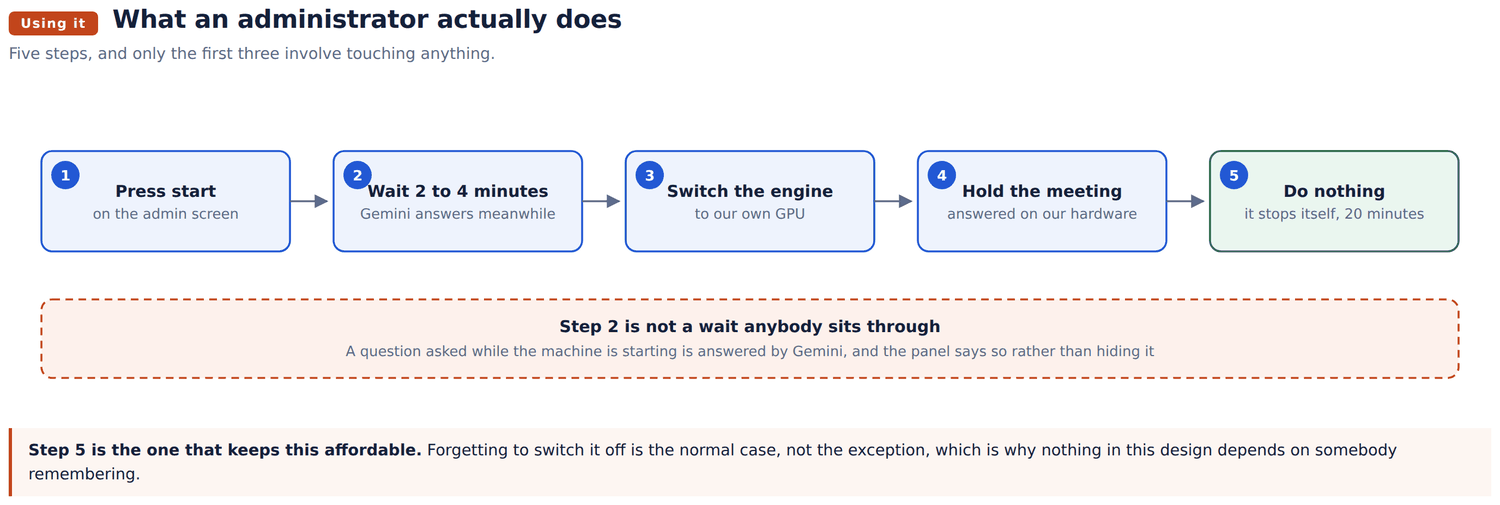
Open the admin screen. The AI engine panel sits at the top.
Nobody has to wait for step 1 to finish. Questions asked while the machine is starting are answered by Gemini, and the panel says plainly that this is what happened. That is the behaviour the whole design is built around, and section 10 tests it deliberately.
When the meeting is over, press Stop it, or do nothing and let it stop itself twenty minutes later.
On the machine:
systemctl status ollama
systemctl list-timers ollama-idle-off.timer
curl -s localhost:11434/api/tags | head
sudo /usr/local/bin/ollama-idle-off.sh    # prints why it is or is not stopping
From the Service Assistant, which also proves the security group:
curl -s --max-time 5 http://GPU_IP:11434/api/tags | headThen the four that matter, in order:
The panel should report that the GPU answered.
open model is noticeably worse at this, that is worth finding out now rather than in front of an audience.
be answered by Gemini, and the panel must say it fell back. This is the most important test in this document, because it is what happens the day somebody forgets to press start.
stops it about 45 minutes later. This is the only test of the path the on machine timer cannot cover.
Then, separately, leave it running and untouched and confirm it stops itself inside about 25 minutes. Check in the console that it really reads stopped, not merely idle.
| Running | Stopped | |
|---|---|---|
| The machine | about $0.80 an hour | nothing |
| Its disk | about $8 a month | about $8 a month |
| The safety net | nothing | nothing |
An hour before a meeting and twenty minutes after the last question, a few times a week, is a handful of dollars a month on top of the disk. Left running by accident for a month it is about $580.
The whole difference between those two numbers is section 7. That is why it has two mechanisms and four separate tests rather than one of each.