Installation
Installing the open model, and wiring it to FastAPI
The software half of running our own AI: installing Ollama, choosing and pulling a model, making it reachable, and the four modules on the FastAPI side that decide where a question goes. Includes how to run the whole thing with no GPU at all.
Abad Naseer · 29 August 2026 · every command run against a real machine
Running the Service Assistant's answers on an open model we host ourselves, instead of on Google's.
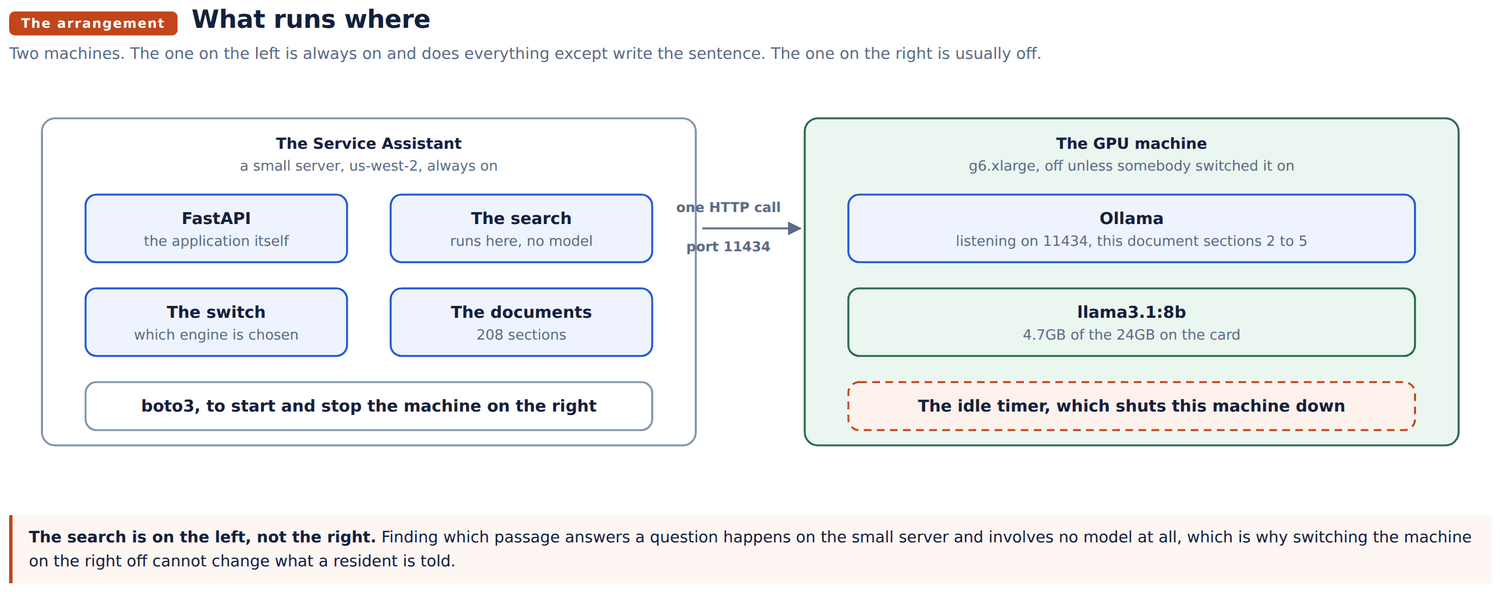
There are two halves to that. The AWS half, creating the machine and keeping it from running up a bill, is the gpu-setup document. This is the software half: installing the model server, choosing a model, making it reachable, and the four small modules on the application side that decide where a question goes.
You can follow all of it today without any AWS account at all. Section 9 runs the whole arrangement against a model on your own laptop, which is the sensible way to check the integration before spending eighty cents an hour on it.
Ollama is the program that loads a model into the graphics card and answers requests about it over HTTP. One command:
curl -fsSL https://ollama.com/install.sh | shIt installs itself as a systemd service and starts. Check it:
systemctl status ollama
curl -s localhost:11434/api/tags
An empty list from that second command is correct. Nothing has been pulled yet.
On the GPU machine, use the Deep Learning Base OSS Nvidia Driver AMI and the graphics driver is already there. On any other machine you will need the driver first, and it is the longest and most failure prone part of the job. nvidia-smi should print a table before you go further.
ollama pull llama3.1:8bAbout 5GB, once. The 24GB card we are using holds it several times over, which leaves room to try something larger later without changing machines.
Model names carry their size and their quantisation. llama3.1:8b is eight billion parameters at the default four bit quantisation, which is the sweet spot for this job: our engine is not reasoning about anything, it is turning a passage that has already been found into a readable sentence.
| Model | Size on disk | Speed on an L4 | Worth it when |
|---|---|---|---|
llama3.1:8b | 4.7GB | 45 to 55 words a second | the default, and what we run |
qwen2.5:14b | 9GB | 25 to 30 words a second | the wording matters more than the wait |
llama3.2:3b | 2GB | 90 or more | you want it to feel instant and will accept blunter prose |
Check what is installed with ollama list, and try one by hand:
ollama run llama3.1:8b "say hello in one short sentence"By default Ollama listens on localhost only, so nothing else can reach it. That is a sensible default and it has to be changed for our purpose.
sudo mkdir -p /etc/systemd/system/ollama.service.d
sudo tee /etc/systemd/system/ollama.service.d/override.conf >/dev/null <<'EOF'
[Service]
Environment="OLLAMA_HOST=0.0.0.0:11434"
Environment="OLLAMA_KEEP_ALIVE=25m"
EOF
sudo systemctl daemon-reload
sudo systemctl restart ollama
Ollama has no password and no authentication of any kind. Anything that can reach port 11434 can use the card. Open that port to the Service Assistant's address and to nothing else. It is a scanned port, and an open one is a free GPU for whoever finds it.
OLLAMA_KEEP_ALIVE=25m above is deliberate, and it is deliberately longer than the twenty minute idle timeout that shuts the machine down.
Ollama unloads a model that has not been used for a while, and loading an 8B model back into the card costs several seconds. Set the keep alive shorter than the shutdown timer and you get the worst of both: the machine is still running and still being paid for, but the first question after a quiet spell is slow anyway. Set it longer and any question that arrives while the machine is alive is answered at full speed.
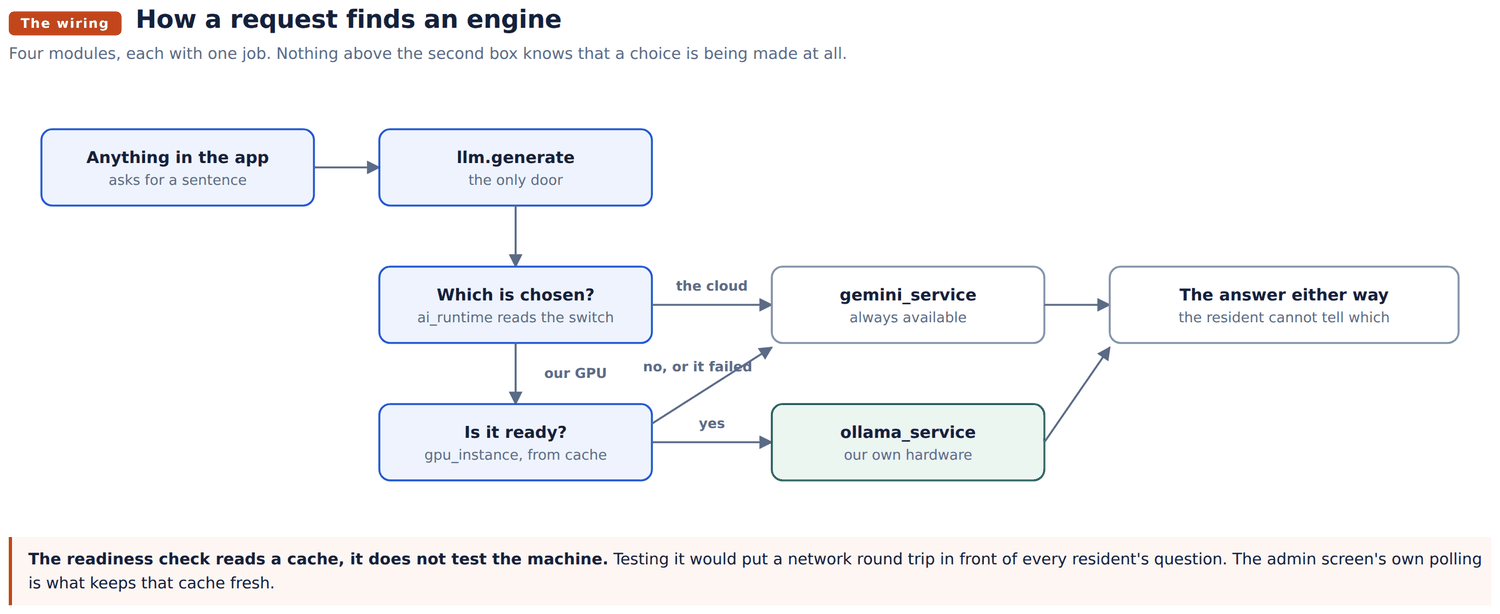
Nothing in the rest of the application knows that an engine exists. It asks one module for a sentence and gets one.
| Module | Its one job |
|---|---|
services/ollama_service.py | Speaks HTTP to Ollama. Returns the text, or None. Never raises |
services/llm.py | Decides which engine gets the question, and falls back |
services/ai_runtime.py | Holds the switch: which engine is currently chosen |
services/gpu_instance.py | Starts and stops the machine, and knows its address |
Two rules hold this together, and both are easy to break by accident.
Everything returns a value, nothing raises. ollama_service.generate gives back the answer or None. Every caller in the application already treats None as "use the plain composed text instead", which is what makes a second engine safe to drop in at all.
The readiness check never sits on the request path. llm.generate reads a cached health reading rather than testing the machine, because testing it would add a network round trip to every resident's question. What keeps that cache fresh is the admin screen's own polling, which is running at exactly the moment somebody is watching the machine start.
Four values in the Service Assistant's .env:
GPU_INSTANCE_ID=i-0123456789abcdef0
AWS_REGION=us-west-2
AWS_ACCESS_KEY_ID=AKIA...
AWS_SECRET_ACCESS_KEY=...
And, importantly, not the address of the machine.
A stopped instance loses its public address and is given a different one when it starts again. Anything written down here would be correct exactly once. The application asks AWS for the current address in the same call it already makes to ask whether the machine is running, so the address is right by construction and costs nothing extra.
Which engine is chosen is also not here. It lives in app/data/ai_runtime.json, because this file is read once when the application starts, and a switch that needed a restart would be no use a minute before a meeting.
All of them require the admin token or an admin login.
| Method | Path | What it does |
|---|---|---|
| GET | /api/v1/admin/ai/status | Which engine is chosen, what actually answered last, and what the machine is doing |
| POST | /api/v1/admin/ai/provider | Switch between gemini and gpu |
| POST | /api/v1/admin/ai/gpu/start | Start the machine |
| POST | /api/v1/admin/ai/gpu/stop | Stop it |
curl -s -H "X-Admin-Token: $ADMIN_TOKEN" \
  https://servicez.smartzees.com/api/v1/admin/ai/status | python3 -m json.tool
The status response says two different things on purpose: which engine is chosen, and which engine actually answered the last question. They disagree whenever the machine is off, and showing only the first is how a demonstration ends up claiming credit for work the cloud did.
This is the section worth reading before anything is bought.
Install Ollama on any machine you already have, including a laptop, pull a small model, and point the Service Assistant at it:
ollama pull llama3.2:3bThen in .env:
OLLAMA_URL=http://127.0.0.1:11434
OLLAMA_MODEL=llama3.2:3b
OLLAMA_URL is the manual override. When it is set, the application talks to that address and never asks AWS anything, so no instance, no key and no account are involved. Switch the engine to our own GPU on the admin screen and ask the assistant a question: it is now being answered on your own machine.
Everything except starting and stopping hardware behaves exactly as it will in production, including the fallback. Stop Ollama with sudo systemctl stop ollama and ask another question. It should be answered anyway, by the cloud, and the admin screen should say so.
Leave OLLAMA_URL empty in production.
Nothing answers, and the log says the request failed. The port is not open to the machine asking. Check the security group first: it is the cause four times out of five. curl --max-time 5 http://ADDRESS:11434/api/tags from the Service Assistant tells you in a second.
It answers, but the first question after a quiet spell is slow. The model was unloaded. OLLAMA_KEEP_ALIVE is shorter than the gap between questions. See section 5.
A perfectly good reply that is not JSON. A stopped instance's address gets reassigned to somebody else's machine, which answers with its own web page and a 200 on it. The application already treats that as a failure and falls back; if you are seeing it in the log, the stored address is stale.
The switch says our GPU and the cloud keeps answering. Read the reason on the admin screen rather than guessing. It says which of "stopped", "still starting", "not answering yet" applies. "Not answering yet" for a running machine means Ollama is up but the model is still loading, which is normal for the first minute.
Out of memory when pulling a second model. ollama ps shows what is resident. Ollama will hold several models at once if asked, and 24GB goes faster than expected. ollama stop MODEL unloads one.
ollama pull qwen2.5:14bThen set OLLAMA_MODEL=qwen2.5:14b in .env and restart the Service Assistant. Nothing else changes: the module that talks to Ollama takes the model name from configuration on every call.
Compare them on real questions before switching for good. Ask the same question on each and read both answers side by side. The thing to watch is not eloquence, it is whether the answer stays inside what the document actually said, because that is the only thing this engine is being asked to do.